Moved to very own site OpenAlam, and it is based on WordPress.
Please found all new updates over there.
04 May, 2010
18 April, 2010
Chrome – test Drive…
Google chrome released long time back, I never tried it, but after using some mobile services and read about N900 + Chrome, I thought to test run. Finally start with Mac OS version, then tried on Linux (Fedora x86_64 RPM build by google), and Finally on Windows. It imported all data from Firefox on All platforms very easily , no error, and look was same on all OS, Same feel.
Book Mark Sync was quick feature, which I liked most as Firefox, need to install Weave and then it ask Few more username and password and PIN, then start sync, but for Chrome, someone need only Google a/c and it is done. But what I missed is Merge feature, which works better on Firefox (it ask what to merge), but chrome don’t. You have to merge or not sync at all. Secondly not sure, but I found it is not syncing Password and Browser history like Mozilla Weave
Overall smooth ride, cool look, faster loading, interface than Firefox.
for i18n/l10n point, it is not available in my language (Punjabi), for which I pushed Issue. For Indic, it is available in Bengali, Gujarati, Hindi, Marathi, Oriya, Tamil, Telugu.
it is Open Source, so got en-GB file to translate, start work if I can push to Google, where I am not sure whether they accept code or not.
06 April, 2010
Punjabi input on Nokia N900...
Punjabi Keyboard (virtual) layout is ready for Use with Nokia N900.
Please suggest if you have any comments about it.
Add Punjabi Layout to N900:
Download ukeyboard
install it on your device.
Download attached file n900keyboardlayout.zip [1], unzip it
and scp "pa-jhelum.vkb" file to N900 in following directory:
/usr/share/ukeyboard
Enable Punjabi Layout:
Goto
Settings-> Text input -> 1st language --Change this to ਜੇਹਲਮ (ਪੰਜਾਬੀ)
Now you can start type Punjabi. Meanwhile I am trying to add
this layout to ukeyboard so that Punjabi support available
by default.
Note: you need to install fonts for Punjabi, please read
Enable Punjabi on N900
[1] Source file for that is also attached, if you want to change, you can
easily do that. Following ukeyboard instructions to edit and compile it.
Please suggest if you have any comments about it.
Add Punjabi Layout to N900:
Download ukeyboard
install it on your device.
Download attached file n900keyboardlayout.zip [1], unzip it
and scp "pa-jhelum.vkb" file to N900 in following directory:
/usr/share/ukeyboard
Enable Punjabi Layout:
Goto
Settings-> Text input -> 1st language --Change this to ਜੇਹਲਮ (ਪੰਜਾਬੀ)
Now you can start type Punjabi. Meanwhile I am trying to add
this layout to ukeyboard so that Punjabi support available
by default.
Note: you need to install fonts for Punjabi, please read
Enable Punjabi on N900
[1] Source file for that is also attached, if you want to change, you can
easily do that. Following ukeyboard instructions to edit and compile it.
29 March, 2010
Motorola is Back (India)....
Missing Motorola after A1600 release ( with Linux OS), but
now it is back with Motorola MileStone with following
specification:

ANDROID OPERATING SYSTEM - Android 2.1
Camera: 5 MP Dual LED Flash
3G WCDMA/900/2100, GSM 850/900/1800/1900, HSPA, GPRS Class 12, WiFi
BATTERY TYPE - 1400 mAh Li Ion
DISPLAY TYPE - TFT
WEIGHT - 165 g (heavy)
SIZE 60.00 x 115.80 x 13.70 mm
DISPLAY SIZE 3.7"; WVGA (480 x 854 pixels); 16:9 widescreen; PPI 267
PROCESSOR SPEED - 550 MHz (Slow)
Buy cost is ~32,000 INR, which seems too costly when we
compare with latest Sony Ericsson X10. X10 with
almost same price provide more feature, almost all
feature with 1Ghz, which make phone future-proof
(minimum for few months at least).
you can check compare at GSMarena
But it seems motorola is back (which I like more than
other phone brand, it is first brand to bring Linux phone
in India E6)
now it is back with Motorola MileStone with following
specification:
ANDROID OPERATING SYSTEM - Android 2.1
Camera: 5 MP Dual LED Flash
3G WCDMA/900/2100, GSM 850/900/1800/1900, HSPA, GPRS Class 12, WiFi
BATTERY TYPE - 1400 mAh Li Ion
DISPLAY TYPE - TFT
WEIGHT - 165 g (heavy)
SIZE 60.00 x 115.80 x 13.70 mm
DISPLAY SIZE 3.7"; WVGA (480 x 854 pixels); 16:9 widescreen; PPI 267
PROCESSOR SPEED - 550 MHz (Slow)
Buy cost is ~32,000 INR, which seems too costly when we
compare with latest Sony Ericsson X10. X10 with
almost same price provide more feature, almost all
feature with 1Ghz, which make phone future-proof
(minimum for few months at least).
you can check compare at GSMarena
But it seems motorola is back (which I like more than
other phone brand, it is first brand to bring Linux phone
in India E6)
22 February, 2010
KDE 4.4 and Indian Calendar System
I have never seen anywhere such a system,
but in KDE 4.4, in which Indian Calendar system
can be choose at Desktop system.
In kde, choose systemsettings->Regional & Language
->Language-> Time and Date.
There is Indian Calendar, so after login and logout,
you can check it.
Following image has enough detail about it.

KDE 4.4 with Phalgun Month
Month: Phalgun
Day: Som (Monday)
Year: 1931
with time, software becoming more useful and more
close not only to hi-fi people, but general public.
After all those are for them, by them.
15 February, 2010
N900 with Punjabi support....
I got N900 for Testing Punjabi on it.
While need to install fonts, I was not
clear about rendering after installing
fonts. it is based on Maemo Linux, so
you can install/use application easily
After install openssl-client/server,
scp lohit-punjabi fonts from fedora
machine to N900 and 'fc-cache',
run 'fennec'.

While after reboot, I can see the
Punjabi in mail and other places
(no interface translation available yet).
Most Important thing was Rendering,
which is just working and good enough
to use. fonts was installed on N810, but
there is Punjabi Rendering was broken

More Screenshot you can check here
from i18n Point of view, following task with status:
---
-Fonts- Working - Need to package
-Rendering - Working - Nothing to Done
-Input - Need to Work - Need to Package
---
Now Android:
No Indian Language is supported as such, but
Same as Apple iPhone.
Now it seems Nokia should work fast, but less
hard to provide Indian language as Rendering is
working and just installing fonts can
help to enable support.
While need to install fonts, I was not
clear about rendering after installing
fonts. it is based on Maemo Linux, so
you can install/use application easily
After install openssl-client/server,
scp lohit-punjabi fonts from fedora
machine to N900 and 'fc-cache',
run 'fennec'.
While after reboot, I can see the
Punjabi in mail and other places
(no interface translation available yet).
Most Important thing was Rendering,
which is just working and good enough
to use. fonts was installed on N810, but
there is Punjabi Rendering was broken
More Screenshot you can check here
from i18n Point of view, following task with status:
---
-Fonts- Working - Need to package
-Rendering - Working - Nothing to Done
-Input - Need to Work - Need to Package
---
Now Android:
No Indian Language is supported as such, but
got a chance to check Samsung Galaxy Spica
It has Hindi Interface, but Rendering broken.Same as Apple iPhone.
Now it seems Nokia should work fast, but less
hard to provide Indian language as Rendering is
working and just installing fonts can
help to enable support.
14 February, 2010
MS Office Bug for Punjabi Rendering…
After many year, I was working on Microsoft
Word/Power Point. version it 2007 (2010 Beta),
both has common problem for Punjabi (Gurmukhi)
rendering. While Input Character with Bindi
(ਸ/ਗ/ਜ/ਫ/ਲ) and use (਼) with it, then input
any dependent vowel, it delete the (਼)
character.
ਗ + ਼ + ੀ = ਗੀ
it is happening only with Office only,
while WordPad and NotePad is ok.
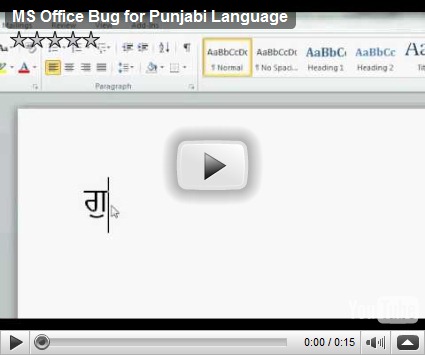
is here and Test case is below.
---
----
Character + Bindi + Dependant Vowel = Resutl
---
Failed Case
ਸ + ਼ + ਾ = ਸ਼ਾ
ਖ + ਼ + ੈ= ਖ਼ੈ
ਗ + ਼ + ਿ = ਗ਼ਿ
ਜ + ਼ + ੀ = ਜ਼ਿ
ਲ + ਼ + ੁ = ਲ਼ੁ
ਫ + ਼ + ੇ = ਫ਼ੇ
-----
PASS Case
----
ਸ਼ + ਾ= ਸ਼ਾ
ਖ਼ + ੈ=ਖ਼ੈ
ਗ਼ + ਿ=ਗ਼ਿ
ਜ਼ + ੀ=ਜ਼ੀ
ਲ਼ + ੁ=ਲ਼ੁ
ਫ਼ + ੇ=ਫ਼ੇ
---
Try to delete and paste Dependent Vowel at end.
Don’t know how to Find Revision/Version of MS Office and how to report to Microsoft:-(
03 February, 2010
I got Dell Studio 1457 with Intel i7 processor yesterday.
for Fedora 12 installation major problems:
1) Broadcom Ethernet is not detected (fixed)
2) Once Display Blank, reboot and then only start,
(this was true for anaconda also) (still not working)
3) No Sound (still not working) Fedora Bug 562695
Dell Studio 1457 Smolt Profile
Installation:
after 4 attempt to install Fedora 12, (3 failed
with no display), I get message that there is
no Network device detected on your machine,
so please use DVD or Complete CD (I was
using network install). (that is why
keep DVD with you at home:-) )
Got KDE Live CD, installation was quite fast,
Ethernet was not detected, but Wireless
was working (it is intel half-mini card).
Rebooted and Display gone. After waiting
for few minutes, reboot again this time
display was working (now after shutdown,
I need to reboot 2 times to get display working)
Broadcom Ethernet:
there is workaround given here (Fedora Bug)
---
modprobe -r tg3
it is working, but need to use this each time
Video: ATI detected and worked on proper resolution automatically
Audio: Still not working
KDE System Monitor showing 8 Cores (i7 has 4 core / 8 threads)


for Fedora 12 installation major problems:
1) Broadcom Ethernet is not detected (fixed)
2) Once Display Blank, reboot and then only start,
(this was true for anaconda also) (still not working)
3) No Sound (still not working) Fedora Bug 562695
Dell Studio 1457 Smolt Profile
Installation:
after 4 attempt to install Fedora 12, (3 failed
with no display), I get message that there is
no Network device detected on your machine,
so please use DVD or Complete CD (I was
using network install). (that is why
keep DVD with you at home:-) )
Got KDE Live CD, installation was quite fast,
Ethernet was not detected, but Wireless
was working (it is intel half-mini card).
Rebooted and Display gone. After waiting
for few minutes, reboot again this time
display was working (now after shutdown,
I need to reboot 2 times to get display working)
Broadcom Ethernet:
there is workaround given here (Fedora Bug)
---
modprobe -r tg3
modprobe broadcom----
modprobe tg3
modprobe tg3
it is working, but need to use this each time
Video: ATI detected and worked on proper resolution automatically
Audio: Still not working
KDE System Monitor showing 8 Cores (i7 has 4 core / 8 threads)

19 January, 2010
KDE 4.4 Beta on my Desktop
While I skipped using KDE from last few months,
after release of KDE4 Beta, tried again.
first impression "Woh!"
please check few screenshot of KDE4 on Fedora 13 (Rawhide)
1) Desktop with few
 2) Adding few more widgets (Mac's Impression)

3) Google translate English to Hindi, Amritsar Weather

4) Activities, which still I failed to understand what and how to do with this:-)

Hope to KDE4 more acceptable in daily work than previous KDE4 releases....
after release of KDE4 Beta, tried again.
first impression "Woh!"
please check few screenshot of KDE4 on Fedora 13 (Rawhide)
1) Desktop with few
 2) Adding few more widgets (Mac's Impression)
3) Google translate English to Hindi, Amritsar Weather

4) Activities, which still I failed to understand what and how to do with this:-)

Hope to KDE4 more acceptable in daily work than previous KDE4 releases....
09 January, 2010
Recovering a lost Windows Serial Key...
During Repair of Dell XPS Laptop, I lost Windows 7's
Cover, which I got as Upgrade from Vista (so no
sticker on laptop). It includes Windows Serial No.
It lost this morning, and I installed Windows
without this key, but as need to activate within
30 days, I have to find some solution.
Two Software I found for this work (as I had already
installed Windows 7 on my old bad sector hard disk)
Belarc Advisor
It has Free, Personal Use, working perfect
Recover-Keys
Free for Demo, not perfect and PAID:-)
Finally, I attach old harddisk, boot windows 7 (old installation),
install both software, Recover-keys find few things
Office, Call for Duty and 1 more, but now Windows key,
Then install Belarc Advisor and it create report and
show me in Web browser, yes it contains Windows keys
with IE serial key. So I got the key to Windows Activation.
It save money and something that Punjabi don't like to do...;-)
More information about OEM Windows Version here.
Cover, which I got as Upgrade from Vista (so no
sticker on laptop). It includes Windows Serial No.
It lost this morning, and I installed Windows
without this key, but as need to activate within
30 days, I have to find some solution.
Two Software I found for this work (as I had already
installed Windows 7 on my old bad sector hard disk)
Belarc Advisor
It has Free, Personal Use, working perfect
Recover-Keys
Free for Demo, not perfect and PAID:-)
Finally, I attach old harddisk, boot windows 7 (old installation),
install both software, Recover-keys find few things
Office, Call for Duty and 1 more, but now Windows key,
Then install Belarc Advisor and it create report and
show me in Web browser, yes it contains Windows keys
with IE serial key. So I got the key to Windows Activation.
It save money and something that Punjabi don't like to do...;-)
More information about OEM Windows Version here.
04 January, 2010
Intel i7-720QM and Core 2 Duo Difference...
While searching for latest, faster Mobile processor,
I just stuck for Intel's Latest Intel i7-720QM.
Surely it seems quite good, but how much from
currently with me? (Intel Core to Duo P8600 and
Intel Core to Duo P9600)
Few Differnce you can get with i7 vs C2D are
following:
i7 based laptop has hal battery life than P8600.
Dell is start selling Laptop with i7 processor, while Intel is going to release
i5 and i3 Mobile Q1 2010.
I just stuck for Intel's Latest Intel i7-720QM.
Surely it seems quite good, but how much from
currently with me? (Intel Core to Duo P8600 and
Intel Core to Duo P9600)
Few Differnce you can get with i7 vs C2D are
following:
| Processor Number | P9600 | P8600 | i7-720QM |
| No. of Cores | 2 | 2 | 4 |
| No. of Threads | 2 | 2 | 8 |
| Processor Base Frequency | 2.66 GHz | 2.4 GHz | 1.6 GHz |
| Max Turbo Frequency | 2.8 GHz | ||
| Cache | 6 MB L2 Cache | 3 MB L2 Cache | 6 MB Intel® Smart Cache |
| Bus/Core Ratio | 9.0 | ||
| Bus Type | FSB | FSB | DMI |
| System Bus | 1066 MHz | 1066 MHz | 2.5 GT/s |
| FSB Parity | No | No | |
| Max TDP | 25 W | 25 W | 45 W |
| Processing Die Size | 107 mm2 | 107 mm2 | 296 mm2 |
| No of Processing Die Transistors | 410 million | 410 million | 774 million |
| Intel® Turbo Boost Technology | No | No | Yes |
| Intel® Hyper-Threading Technology | No | No | Yes |
| Intel® Virtualization Technology (VT-x) | Yes | Yes | Yes |
| Intel® Trusted Execution Technology | Yes | Yes | Yes |
| AES New Instructions | No |
i7 based laptop has hal battery life than P8600.
Dell is start selling Laptop with i7 processor, while Intel is going to release
i5 and i3 Mobile Q1 2010.
24 December, 2009
Mac, Password and local keyboard setting...
First time, just before to login to write this
post, I was stuck with Macbook, where
my user password in English character,
forgot to change keyboard back to English
(from Punjabi), while Close MacBook
(which I often do).
When I opened, it was asking for password,
tried 2-3 times, but failed, then I found that
keyboard layout is Punjabi (not English),
so it was not accpecting password.
I tried Keyboard Shortcut to change like
Fedora/Gnome did. (+ keys),
but it was not changing, Rebooted, but still
asking for password.
Finally I found solution, hard learning, but it
works
Press key + (also
key also w0rks).
may be helpful in very rare condition, but it is
working this way....
post, I was stuck with Macbook, where
my user password in English character,
forgot to change keyboard back to English
(from Punjabi), while Close MacBook
(which I often do).
When I opened, it was asking for password,
tried 2-3 times, but failed, then I found that
keyboard layout is Punjabi (not English),
so it was not accpecting password.
I tried Keyboard Shortcut to change like
Fedora/Gnome did. (
but it was not changing, Rebooted, but still
asking for password.
Finally I found solution, hard learning, but it
works
Press key +
key also w0rks).
may be helpful in very rare condition, but it is
working this way....
18 December, 2009
Punjabi Support Enable on Windows 7
Windows 7 has Unicode 5.1 Support for Punjabi,
it is very easy to enable this support on Windows.
If you take care during installation and select Punjabi
(it is Punjabi (India)), in Language list, then
it is very easy.
I have put few screenshot here to Enable Punjabi Support
Control Panel
Load the control panel by clicking on the "Start"' menu and pressing the "Control Panel" icon. Make sure you are in category view. Select the icon that says "Clock, Language and Regional Options" and then select "Region and Language"

Region and Language
Select the "Format" tab and make sure you select the option saying "English (USA)" and select "Punjabi (India)".

INPUT Punjabi
 Type Punjabi On Desktop
Now you can see icon near Notification area with "EN" as shown

You can use the combination ALT + SHIFT to switch between different keyboard layouts (e.g. from a English Keyboard to Gurmukhi and vice-versa).
Don't know Punjabi Keyboard?
if you are new to Punjabi input and don't know Punjabi Keyboard Layout, there is easy solution to input Punjabi "On-Screen Keyboard".
On-Screen Keyboard can be accessed by clicking on the "Start" -> All Programs -> Accessories -> Ease to Access -> On-Screen Keyboard"

I liked On-Screen Keyboard, which also has Punjabi Support,
just open Keyboard and select Punjabi from Icon (or Alt+Shift),
the you can see the Keyboard in Punjabi.
Complete Detail on Community Website.
Please share it with Punjabi, ask to read/write Punjabi (Gurmukhi) on
their Computer. Ask to Use Unicode, so that we permote our
language over web...
it is very easy to enable this support on Windows.
If you take care during installation and select Punjabi
(it is Punjabi (India)), in Language list, then
it is very easy.
I have put few screenshot here to Enable Punjabi Support
Control Panel
Load the control panel by clicking on the "Start"' menu and pressing the "Control Panel" icon. Make sure you are in category view. Select the icon that says "Clock, Language and Regional Options" and then select "Region and Language"
Region and Language
Select the "Format" tab and make sure you select the option saying "English (USA)" and select "Punjabi (India)".
If you are outside India, please use "Additional Settings" and Change Currency or Select "Location" Tab to select Location.
INPUT Punjabi
Type Punjabi On DesktopNow you can see icon near Notification area with "EN" as shown
You can use the combination ALT + SHIFT to switch between different keyboard layouts (e.g. from a English Keyboard to Gurmukhi and vice-versa).
Don't know Punjabi Keyboard?
if you are new to Punjabi input and don't know Punjabi Keyboard Layout, there is easy solution to input Punjabi "On-Screen Keyboard".
On-Screen Keyboard can be accessed by clicking on the "Start" -> All Programs -> Accessories -> Ease to Access -> On-Screen Keyboard"
I liked On-Screen Keyboard, which also has Punjabi Support,
just open Keyboard and select Punjabi from Icon (or Alt+Shift),
the you can see the Keyboard in Punjabi.
Complete Detail on Community Website.
Please share it with Punjabi, ask to read/write Punjabi (Gurmukhi) on
their Computer. Ask to Use Unicode, so that we permote our
language over web...
13 December, 2009
Maemo 5 on Desktop
I was trying to get Maemo 5 device, but
finally I got easy method to install it on
desktop machine with help of instruction
over here.

finally I got easy method to install it on
desktop machine with help of instruction
over here.

I am working to find a way to include Punjabi (and other
Indic) language to device. Few steps I completed:
Locale-Extras - Updated all Indic locale files
Indic - Project to include all i18n stuff for Indic languages
Keyboard Layout - Virtual/On-Screen Keyboard (which has no Indic support yet)
still I am not able to add my language in it, but find few things
different from my desktop machine:
/usr/share/i18n-locale-resolver/
more time required to work on this, but I have next Internet
connection in coming weeks.
This system setup on Ubuntu AMD64. Often forgot to
put variable vdso32=0 for kernel at boot time.
Indic) language to device. Few steps I completed:
Locale-Extras - Updated all Indic locale files
Indic - Project to include all i18n stuff for Indic languages
Keyboard Layout - Virtual/On-Screen Keyboard (which has no Indic support yet)
still I am not able to add my language in it, but find few things
different from my desktop machine:
/usr/share/i18n-locale-resolver/
more time required to work on this, but I have next Internet
connection in coming weeks.
This system setup on Ubuntu AMD64. Often forgot to
put variable vdso32=0 for kernel at boot time.
08 November, 2009
Intel Inside out - Now in US
Another News about Intel's GREAT Success
story to remain Big in market.
This News from US (previous from EU),
where State of New York file case against
Intel to pay money to AMD.
HP is second in line not to Do or Delay
release for AMD.
Dell as my personal experience, they are
not selling direct AMD, only through
Phone and salesman will let you know
various short-comes in AMD deals, provide
better deals in Intel only (this is India's story).
if you remember EU's fine to Intel (around 3.45 billion in May),
Intel reply them with various reasons, but final
reply from EU you can read here
So, this is Intel's Inside story, US prepared
after EU, but I am not sure about my country
whether they will start find wrong business
deals or not as Intel may pay more money now
to politician or Officers than EU/US.:-)
story to remain Big in market.
This News from US (previous from EU),
where State of New York file case against
Intel to pay money to AMD.
HP is second in line not to Do or Delay
release for AMD.
Dell as my personal experience, they are
not selling direct AMD, only through
Phone and salesman will let you know
various short-comes in AMD deals, provide
better deals in Intel only (this is India's story).
if you remember EU's fine to Intel (around 3.45 billion in May),
Intel reply them with various reasons, but final
reply from EU you can read here
So, this is Intel's Inside story, US prepared
after EU, but I am not sure about my country
whether they will start find wrong business
deals or not as Intel may pay more money now
to politician or Officers than EU/US.:-)
06 November, 2009
Snow leopard (Mac OS X 10.6), Punjabi and Unicode 5.1
Newly available Mac Snow Leopard, which suppose
to be supporting Unicode 5.1 standard.
After upgrading from Mac OS X 10.5 (leopard) to
Mac OS X 10.6 (Snow Leopard), Finally
I got that it is not supporting Punjabi (Gurmukhi) with
Unicode 5.1 standard.
Please use This Test Page to test Gurmukhi Unicode,
where you will find that following characters are missing
from fonts.
0A01
0A03
0A33 //This Test case working on 1 Mac machine, not on mine
0A51
0A75
Need to test other Indian Languages, not sure about
Apple's statement about Unicode 5.1 support whehter
it is about Indic language or not.
For Gurmukhi, need bug, going to file after confirming
with more mac users.
to be supporting Unicode 5.1 standard.
After upgrading from Mac OS X 10.5 (leopard) to
Mac OS X 10.6 (Snow Leopard), Finally
I got that it is not supporting Punjabi (Gurmukhi) with
Unicode 5.1 standard.
Please use This Test Page to test Gurmukhi Unicode,
where you will find that following characters are missing
from fonts.
0A01
0A03
0A33 //This Test case working on 1 Mac machine, not on mine
0A51
0A75
Need to test other Indian Languages, not sure about
Apple's statement about Unicode 5.1 support whehter
it is about Indic language or not.
For Gurmukhi, need bug, going to file after confirming
with more mac users.
30 October, 2009
Fedora Rawhide installation with Basic Video driver...
Installation on AMD Chipset 785 Failed (Fedora Bug)
with Default GUI, so Tried with Basic Video driver
(during Boot option), GUI installation started, even it
was not good, but working,
after installation, it was not showing proper
resolution on my Monitor, display was not good.
/etc/X11/xorg.conf file was showing 'vesa' display
driver, if you need to get proper working xserver,
then need to remove that file and just reboot,
it will be automatic detected and work fine.
with Default GUI, so Tried with Basic Video driver
(during Boot option), GUI installation started, even it
was not good, but working,
after installation, it was not showing proper
resolution on my Monitor, display was not good.
/etc/X11/xorg.conf file was showing 'vesa' display
driver, if you need to get proper working xserver,
then need to remove that file and just reboot,
it will be automatic detected and work fine.
27 October, 2009
update/upgrade Available
at home, there are lot of updates pending...
Mac Snow leopard on Mac Book - from Leopard - DVD arrived Today
Windows 7 Home prem. - From Dell Vista HomePre - Waiting for Upgrade DVD
Windows 7 Ultimate - 32-Bit version
Mainboard BIOS Update - 2 pending available
N97 's Firmware - current 12v - waiting for 20v (hope to available, out in Europe)
Fedora 12 - Release Next Month
OpenSUSE 11.2 - 15 Day's release
Mac Snow leopard on Mac Book - from Leopard - DVD arrived Today
Windows 7 Home prem. - From Dell Vista HomePre - Waiting for Upgrade DVD
Windows 7 Ultimate - 32-Bit version
Mainboard BIOS Update - 2 pending available
N97 's Firmware - current 12v - waiting for 20v (hope to available, out in Europe)
Fedora 12 - Release Next Month
OpenSUSE 11.2 - 15 Day's release
21 October, 2009
install compare-locales (from Mozilla l10n tools)
To install compare-locales on Fedora Machine,
'easy_install' need to install, which is NOT
part of python-setuptools, for which I tried
many times to find and install, but it IS
part of python-setuptools-devel (mostly
devel packages don't have command useful
for user).
$yum install python-setuptools-devel
$easy_install compare-locales
so, now you can use this on Fedora to
compare your locale with english strings
How to use, please check Mozilla Website and Blogs
'easy_install' need to install, which is NOT
part of python-setuptools, for which I tried
many times to find and install, but it IS
part of python-setuptools-devel (mostly
devel packages don't have command useful
for user).
$yum install python-setuptools-devel
$easy_install compare-locales
so, now you can use this on Fedora to
compare your locale with english strings
How to use, please check Mozilla Website and Blogs
15 October, 2009
Fedora Repo - How Repodata/boot.iso updated without package update...
I burnt boot.iso yesterday and started today's
testing with that only (as Mailing list was showing
NO package update on rawhide mail )
After finishing installation I by mistake run
rsync script to sync with server, and wondered
to see updated Boot.iso and 'repodata' folder,
Not very sure about this, not know what is updated in
that,
So Finally I have to start my testing back.
testing with that only (as Mailing list was showing
NO package update on rawhide mail )
After finishing installation I by mistake run
rsync script to sync with server, and wondered
to see updated Boot.iso and 'repodata' folder,
Not very sure about this, not know what is updated in
that,
So Finally I have to start my testing back.
Subscribe to:
Posts (Atom)


